
How to create a LEGO mosaic
UPDATE: the kids have created a business based on this idea. If you’re interested in having a mosaic made from your photo, please visit www.thebrickbrothers.com.
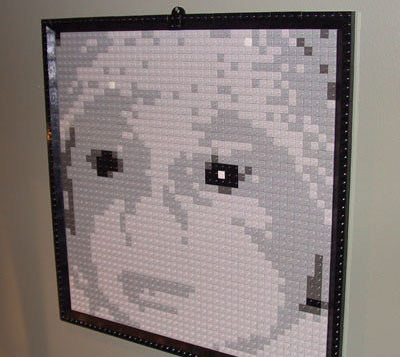
When my oldest son was born in 2001 LEGO offered a cool online “Brick-o-lizer” that would take an uploaded photo and turn it into a five-tone grayscale grid of 1×1 bricks from which you could create a wall-hanging mosaic. LEGO would send you the exact right amount of bricks in bulk. Putting it together was as easy as paint-by-numbers. I did this for him and for his little brother in 2003.
My daughter was born a few weeks ago and so naturally I went back to the Brick-o-lizer to create her mosaic. Imagine my horror to find out that it isn’t available anymore. How could I deprive my baby girl of her LEGO mosaic? Well. Obviously. I couldn’t.
So, here follows instructions for doing it manually in Photoshop. (But before we begin, let’s be sure to acknowledge the unbelievably talented people who create LEGO mosaics in full color without a grid at all. I bow to your supremacy.)

First, prep your shot as a square. For portraits, tight in is best. People will naturally view your mosaic from a distance or squinting to maximize contrast so details external to the person in the portrait will be lost (and a benefit-free pain in the ass to snap into the LEGO grid for you).


Change the photo to Indexed Color, select a Custom palette, and choose six shades of gray. The easiest way is to click on the grid and then when the color palette comes up choose Web colors only. Select white, black, and then a light, medium, and dark gray.

In Preferences > Guides, Grids, & Slices set the Grid to a prominent color, gridline every 10 pixels, and subdivisions 1. Turn on a grid with View > Show > Grid.
You’ll need to do some manual computation. The grid is 44 x 44 which is 1,936 bricks. Eyeball or, if you prefer, count as many of each of the five colors you will need.
You’ll then need to go to the LEGO shop and order the bricks.
You’ll need one X-Large Gray Baseplate , one set of 2×4 Roof Tiles Steep Sloped Black, one set of Black Roof Tiles 25° (2×2, 2×4, Corner), and then as many 1×1 Studs in White, Light Grey, Medium Grey, Dark Grey, and Black as you need.
Once it all arrives, use your gridded Photoshop image or print it out and enjoy a few hours of mind-numbing bricklaying.
25 Responses to “How to create a LEGO mosaic”
Mission Elapsed Time: 20:00:21:06:42:40

I went back through this blog (and my Flickr account) on its 20th anniversary, retracing digital footprints made on what feels like a different planet. Here are some highlights.
The Terror Tourist
Explorations of place in horror fiction — real or imagined, geographical or psychological — culled from my time on The Heavy Leather Horror Show 2023-2026.
Subscribe to the podcast or the email newsletter or just read through the archives posted here.
The Ampcamper

How I hauled myself, two teens, an 80 lb dog, and a whole load of crap 4000+ miles across six states in twenty days using an electric vehicle. And survived to tell the tale.


Dude. You’re kidding me.
Look: http://www.hollyrhea.com/?p=423
WOW!! That is truly amazing! I’ve been looking for this for my sons’ room and the LEGO folks even told me to visit their website but I couldn’t find it any where on their site! This is awesome!! Both my sons love Legos and this will be in their room soon, if I have the patience to do all this. THANKS for the brilliant idea!!
For those (like me) who don’t own Photoshop, it looks like Lego still offers the deal:
http://shop.lego.com/shopmosaic/default_s.asp
-Rob
The feature is still there, but I think it is busted when you go to print out the grid, save your mosaic, or purchase the bricks. Just an error screen.
Um…1×1 white studs appear to be no longer offered. Which is a shame because I was going to make this for my wife’s b-day this month.
Can you think of an alternative?
Great idea
i want one for myself
I also dugg the story
Please add your diggs to make story a homepage story of Digg
http://digg.com/design/How_to_Create_a_LEGO_mosaic_I_want_to_make_one
There are a couple of alternatives for the white studs. You could darken the brightness just a hair, making most of the whites the light gray. Also, if you only have a dozen or so white squares and you have some LEGO sets at home you probably have enough. (I didn’t need to order white bricks for instance since there were so few.)
Also, there are bunch of LEGO bulk resellers on the web. See http://www.bricksinbulk.com/ for one.
Good luck!
Kewl1!!
Great idea – we linked to your post from
http://blog.simplehuman.com.
Hey I ordered all the pieces and am ready to do a picture. However, I am not sure how to do the border. The pictures does not show enough detail. Can you describe the order a little?
Most of the bricks are black slopes. The corners where these would meet are 4×4 inverted black slopes.
Good luck.
John
This is a great idea. My customers are always looking for ways to personalize something for thier childrens rooms and this would fit in perfectly. I’ll pass them on to your site. Thanks.
This site will take the lego thing a huge step further! Pixel blocks has an on-site pixel-ater!
http://www.pixelblocks.com/cgi-bin/WebObjects/pbonline.woa/wa/deferred?vu42f0lctu
I love this idea! Does anyone have suggestions for finding the white and black 1×1 studs? Lego discontinued them. ;-( I found limited numbers on e-bay, definitely not enough to complete the picture. Would this concept work with the blocks instead?
Any Ideas on doing color versions? I would like more detail than the black and white ones
OK, so my picture is under way… yay! How do you hang it when it’s finished?
Looks like a simpler version of the Tori Amos instructions posted at http://www.bluedust.com/lego/
Nice tutorial!
I tried doing one of a friend of mine’s son Graham – it looks pretty cool as a mosaic, but you definitely have to be farther away to appreciate it. [Brickworkz.com] (look for the image at the top of the page.)
I think that with some dithering you would achieve much nicer results. Make a palette of the available colors (which could include other LEGO colors as well) and dither your truecolor image to this (very restricted) colors.
If you want to buy the specific amount you need, check out http://www.bricklink.com
It’s an online “Lego Marketplace”. Kind of like eBay for Lego lovers.
Were od you buy all of that lego you have if you dont anwser me i’ll be very mad!
I completed one for my fiance last year, but I increased the contrast 65% and had much better results. It allowed more white, and thus more definition of facial features. Give it a try!
A fantastic site, and brilliant effort. A great piece of work.,
I will definitely try this – my way is a little bit more creative / harder / more expensive:
http://simoncpage.co.uk/blog/2008/11/23/creative-lego-art-design/
ever tried http://www.brixels.net ?